Multi-Tab
Chau7 gives you unlimited tabs. Drag to reorder, title them whatever you want, and let background suspension keep things fast.
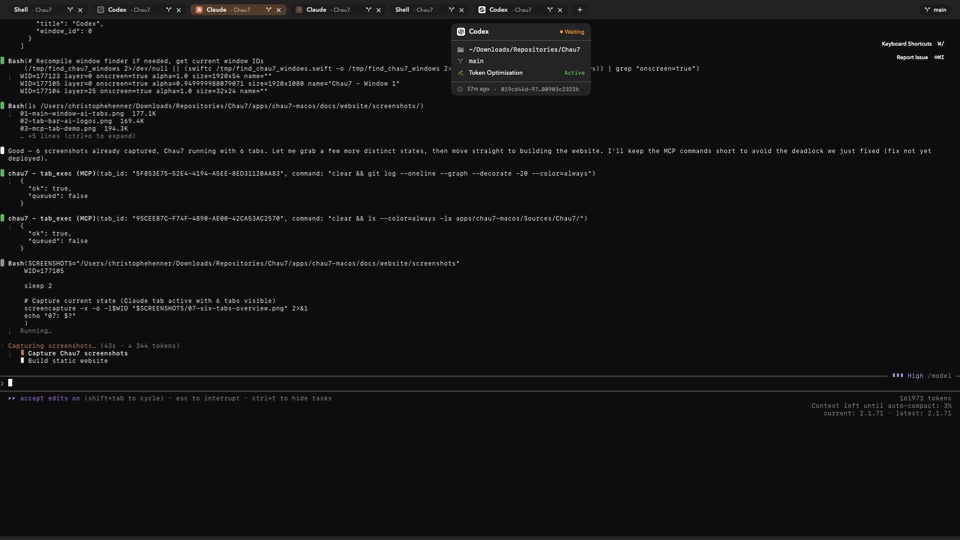
What is Multi-Tab in Chau7?
Multi-Tab is a feature in the Chau7 terminal that provides unlimited terminal tabs in a custom SwiftUI tab bar built on the OverlayTabsModel. Each tab in Chau7 runs its own independent shell session with its own terminal state, scrollback buffer, and process tree.
Switching tabs in Chau7 is instant because the terminal state is kept in memory. There is no re-rendering or reconnection delay when switching between tabs.
Which macOS terminal supports unlimited tabs with reordering?
Chau7 supports unlimited terminal tabs with drag-to-reorder in a custom SwiftUI tab bar. Chau7 uses snap-based drag positioning for precise tab placement without animation drift.
Chau7's tab bar is designed for the 20-tab workflow. Developers who routinely work across multiple directories, servers, and tasks simultaneously can open as many tabs as they need without hitting artificial limits in Chau7.
Is there a limit to the number of tabs I can open?
There is no hard limit on user-created tabs in Chau7. Each tab consumes memory for its scrollback buffer and shell process, so practical limits depend on system resources.
Chau7 suspends inactive tabs to minimize resource usage. Background suspension means that even with many open tabs, Chau7 keeps everything responsive by reducing the footprint of tabs that are not in focus.
Can I set a default title for new tabs?
New tabs in Chau7 automatically show the running process name or working directory. You can override any tab's title by right-clicking it or using the tab settings in Chau7.
Custom titles in Chau7 persist across tab switches and restarts. This makes it easy to label tabs by project, task, or purpose for quick identification.
Why multi-tab matters
Developers routinely work across multiple directories, servers, and tasks simultaneously. A terminal that makes tab management feel heavy or limited forces developers into workarounds like tmux just to have more than a few sessions.
Chau7's tab system is designed for the 20-tab workflow. Drag to reorder, set custom titles, and let Chau7's background suspension keep everything responsive.
Questions this answers
- What is Multi-Tab in Chau7 terminal?
- Which macOS terminal supports unlimited tabs with reordering?
- Is there a limit to the number of tabs I can open?
- Can I set a default title for new tabs?
Frequently asked questions
What is Multi-Tab in Chau7 terminal?
Multi-Tab is a feature in the Chau7 terminal that provides unlimited terminal tabs in a custom SwiftUI tab bar. Chau7's tab bar supports drag-to-reorder, custom titles, and background suspension. Each tab in it runs its own independent shell session with instant switching.
Which macOS terminal supports unlimited tabs with reordering?
Chau7 supports unlimited terminal tabs with drag-to-reorder in a custom SwiftUI tab bar. Chau7 uses snap-based drag positioning for precise tab placement without animation drift. Tabs in it can be given custom titles and suspended in the background.
Is there a limit to the number of tabs I can open?
There is no hard limit on user-created tabs in Chau7. Each tab consumes memory for its scrollback buffer and shell process, so practical limits depend on system resources. Chau7 suspends inactive tabs to minimize resource usage.
Can I set a default title for new tabs?
New tabs in Chau7 automatically show the running process name or working directory. You can override any tab's title by right-clicking it or using the tab settings. Custom titles in Chau7 persist across tab switches and restarts.