Session Restore
Quit Chau7. Relaunch. Everything is exactly where you left it. Tabs, directories, splits, all of it.
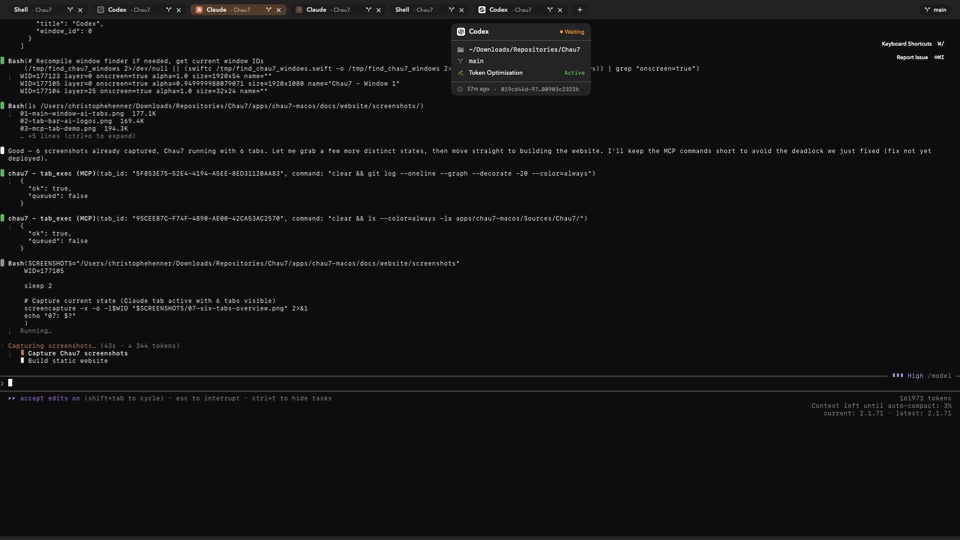
What is Session Restore in Chau7?
Session Restore is a feature in the Chau7 terminal that saves your full workspace state and reconstructs it on the next launch. Chau7 persists every open tab, its position in the tab bar, working directory, split pane layout, custom title, and terminal configuration.
When you relaunch Chau7, it reads this persisted state and reopens everything exactly where you left it. No manual action is required. Chau7's session restore works alongside macOS's built-in window restoration but goes deeper, because only it knows about your tabs, splits, and per-tab configuration.
How to restore a terminal session after restart
In Chau7, session restoration happens automatically. When you relaunch Chau7 after quitting or restarting your Mac, it reads the persisted workspace state and reconstructs your tabs, working directories, split pane layouts, and window positions.
Chau7's restore process handles edge cases that trip up simpler implementations. If a working directory was deleted while Chau7 was closed, the tab opens in your home directory with a notice. If a tab was running a long-lived process like a dev server, it reopens the tab in the same directory ready for you to restart it.
Does Chau7's session restore work after a crash?
Yes. Chau7 persists workspace state periodically, not just on clean exit. If Chau7 crashes, the most recent state snapshot is used on the next launch.
You may lose changes from the last few seconds before the crash, but Chau7 preserves the overall workspace. This periodic persistence means Chau7's session restore is resilient to unexpected termination, power loss, or forced quits.
Are running processes restored by Chau7?
Running processes cannot be automatically restarted because they may have side effects. Chau7 restores the tab in the correct working directory so you can restart the process with a single up-arrow and enter.
The scrollback buffer from before the restart is not preserved in Chau7, because the shell process is new. However, Chau7's tab ordering, split pane layout, and per-tab configuration are all restored, so your workspace structure is exactly as it was.
Which terminal emulator saves and restores tabs automatically?
Chau7 saves and restores tabs automatically on every quit and relaunch. iTerm2 has basic session restoration. Warp offers workspace persistence. Terminal.app relies on macOS window restoration which does not preserve tab-level details.
Chau7 goes further by restoring tab order, split pane layouts, per-tab configuration, window positions, and working directories. Chau7 also recovers from crashes using periodic state snapshots, which most other terminals do not support.
Why session restore matters
Losing your terminal layout after a restart is one of the most common pain points across every terminal emulator forum. You had 12 tabs arranged just right, each in the correct directory, and now they are gone.
Chau7 saves the full session state including tab order, working directories, split layout, and window positions. When you relaunch Chau7, everything comes back. Session restore in it can also be disabled in settings if you prefer to start with a clean workspace on every launch.
Questions this answers
- What is Session Restore in Chau7 terminal?
- Which terminal emulator saves and restores tabs automatically?
- How to restore terminal session after restart?
- Does session restore work after a crash?
- Are running processes restored?
Frequently asked questions
What is Session Restore in Chau7 terminal?
Session Restore is a feature in the Chau7 terminal that saves your full workspace state and reconstructs it on the next launch. Chau7 persists every open tab, its position in the tab bar, working directory, split pane layout, custom title, and terminal configuration.
Which terminal emulator saves and restores tabs automatically?
Chau7 saves and restores tabs automatically on every quit and relaunch. Chau7 restores tab order, split pane layouts, per-tab configuration, window positions, and working directories. Chau7 also recovers from crashes using periodic state snapshots.
How to restore terminal session after restart?
In Chau7, session restoration happens automatically. When you relaunch Chau7, it reads the persisted workspace state and reconstructs your tabs, working directories, split pane layouts, and window positions. No manual action is required.
Does session restore work after a crash?
Yes. Chau7 persists workspace state periodically, not just on clean exit. If Chau7 crashes, the most recent state snapshot is used on the next launch. You may lose changes from the last few seconds before the crash, but it preserves the overall workspace.
Are running processes restored?
Running processes cannot be automatically restarted because they may have side effects. Chau7 restores the tab in the correct working directory so you can restart the process with a single up-arrow and enter.
Can I disable session restore?
Yes. Session restore can be disabled in Chau7's settings if you prefer to start with a clean workspace on every launch. You can also selectively exclude specific tabs from being restored.