26 MCP Tools
Chau7 gives AI agents 26 MCP tools for full terminal control. Your agent just got its own command center.
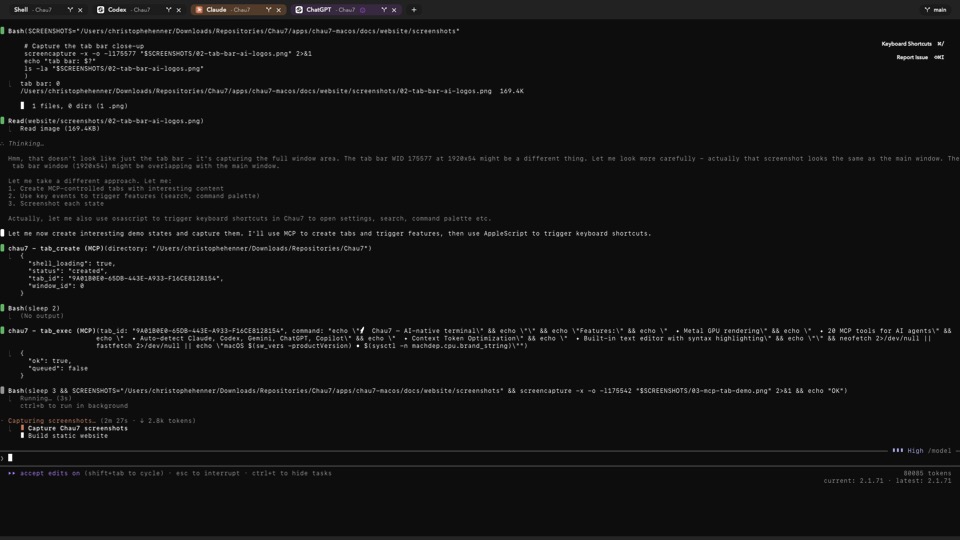
What is 26 MCP Tools in Chau7?
Chau7 exposes 26 MCP tools through its built-in MCP server that give AI agents full terminal control. The Chau7 MCP tools are organized into four groups: tab control (tab_list, tab_create, tab_exec, tab_status, tab_send_input, tab_press_key, tab_submit_prompt, tab_close, tab_output, tab_set_cto), telemetry (run_get, run_list, run_tool_calls, run_transcript, run_tag, run_latest_for_repo), sessions (session_list, session_current), and runtime API (runtime_session_create, runtime_session_list, runtime_session_get, runtime_session_stop, runtime_turn_send, runtime_turn_status, runtime_events_poll, runtime_approval_respond).
Each Chau7 MCP tool maps to a single, well-defined operation. Agents compose complex workflows from these simple building blocks. The tab_exec tool runs a command and waits for completion, returning structured output. The tab_send_input tool handles interactive prompts by sending raw keystrokes. The tab_output tool retrieves scrollback lines so agents can read command results.
How do I let AI agents control my terminal?
Install Chau7 and it auto-registers its MCP server in the config files for Claude Code, Cursor, Windsurf, and Codex. No manual configuration is needed. AI agents then call Chau7's 26 MCP tools over a local Unix socket.
Once registered, agents can call Chau7's tab_create to open new tabs, tab_exec to run commands, tab_output to read results, and tab_status to check process state. Chau7's telemetry tools let agents review their own execution history and learn from previous runs.
How does Chau7's 26 MCP tools compare to other terminals?
No other terminal exposes MCP tools. iTerm2, Warp, Alacritty, and Kitty do not implement the Model Context Protocol and have no structured interface for AI agents.
Without Chau7, AI agents are limited to injecting text into a single terminal session and hoping for the best. With Chau7's 26 purpose-built MCP tools, agents can create tabs, execute commands, read output, inspect processes, track sessions, and manage their own workspace through structured API calls.
Which AI clients work with Chau7's MCP tools?
Any MCP-compatible client works with Chau7's MCP tools. Chau7 auto-registers its server configuration in Claude Code, Cursor, Windsurf, and Codex on every launch. No manual setup is required for these clients.
Other MCP-compatible tools and agents can also connect to Chau7's Unix socket server. Chau7 uses the standard MCP protocol, so any client that speaks MCP can access all 26 tools.
Do Chau7's MCP tools require network access?
No. Chau7's MCP server communicates over a local Unix socket with no network exposure. All tool calls stay on your machine.
No authentication is needed for Chau7's MCP tools because the Unix socket is only accessible to your user account. This design means Chau7's MCP server cannot be reached from other machines or other user accounts on the same machine.
Questions this answers
- What is 26 MCP Tools in Chau7 terminal?
- How does Chau7's 26 MCP tools compare to other terminals?
- How do I let AI agents control my terminal?
- Which AI clients work with Chau7's MCP tools?
- Do the MCP tools require network access?
Frequently asked questions
What is 26 MCP Tools in Chau7 terminal?
Chau7 exposes 26 MCP tools through its built-in MCP server that give AI agents full terminal control. The tools cover tab control (10 tools for lifecycle, execution, and output), telemetry (6 tools for run tracking and transcripts), sessions (2 tools for session listing), and runtime API (8 tools for managing runtime sessions, turns, events, and approvals).
How does Chau7's 26 MCP tools compare to other terminals?
No other terminal exposes MCP tools. iTerm2, Warp, Alacritty, and Kitty do not implement the Model Context Protocol. Chau7 is the only terminal with a built-in MCP server that gives AI agents structured access to tab control, command execution, output capture, telemetry, and runtime session management.
How do I let AI agents control my terminal?
Install Chau7 and it auto-registers its MCP server in the config files for Claude Code, Cursor, Windsurf, and Codex. AI agents then call Chau7's 26 MCP tools to create tabs, execute commands, read output, and access telemetry over a local Unix socket.
Which AI clients work with Chau7's MCP tools?
Any MCP-compatible client works with Chau7's MCP tools, including Claude Code, Cursor, Windsurf, and Codex. Chau7 auto-registers its server configuration in each client's config file on launch, so there is no manual setup required.
Do the MCP tools require network access?
No. Chau7's MCP server communicates over a local Unix socket with no network exposure. All tool calls stay on your machine, and no authentication is needed because the socket is only accessible to your user account.